Blog

  • What a pain in the ass

    Apparently I can’t get incoming calls with the GSI build of /e/OS on a moto g power 5G 2024. It has a MediaTek CPU, guess they weren’t lying about them having issues with different ROMs. Probably should have paid $50 more for the other phone.

    And can’t test it by myself, since I can’t call myself.

    I need the setting “Disable “Voice Call In” route” if I want the audio to work. Sounds like something you need, but in iOS, apparently it just disables the audio going to a device.

    But I did figure out, if messing with certain settings, after rebooting, you should reset the network, click Network & Internet, then click Internet, then click the icon in the top right corner. Hmm, should probably reboot yet again, after doing that.

    Maybe it’ll work tomorrow, the settings aren’t much different though, but I did reset the network more then once.

    It can get stuck on Edge, which is 2G, if you allow 2G, and you might need to allow 2G for IMS.

    I could try changing it to NR/LTE again, and resetting the network, but resetting, might change it back to what it was before. Couldn’t get IMS to register with allow 2G disabled. Some site said you need that for VoLTE calling.

    You can access the phone info by calling *#*#4636#*#* or better use the free Network app. Easier to use the app, since apparently if using MediaTek, you might need it, a lot. Says the IMS info too in there, and you can change to NR/LTE only mode.

    I can get incoming calls on Edge/2G, but nobody can hear me.

    Hmm, did it say resetting or restarting network? Well might have said “internet” not network.

    You can also go to Reset options, and reset the Mobile Network settings. Probably could have done that, or the other thing, instead of reflashing it.

    Also, you may need to delete any MMS “service” APNs, I’m using Ultra Mobile, and there was a Tello MMS “service” in the APNs, that may have been causing issues, you can disable or enable a “service”, might just always be enabled. Find Ultra Mobile’s APN settings here.

    Fucking password manager, was trying to reset a password, but didn’t copy the generated password automatically, so now I get to reset it again.

    Probably won’t do anything else on the phone tonight, rather go to bed earlier.

    On another note, if you want to buy or rebuy Tasker, without using Google Play, it’s expensive, $4 a month, I think forever. They might deactivate your license when you stop paying. I bought it a long time ago, possibly before the new owner, on Google Play. Or whatever it was called then. Not signing into my Google account in the store app that signs lets you download from Google Play, without using their app.

  • pyatv

    There’s a bunch of Apple TV Remote apps, and I’m pretty sure at least one is using pyatv. Cause I had two pyatv remote devices on my Apple TV, think I only had one before.

    Need to make either a web app that I can run on one of my computers, or just a simple keyboard app, that uses pyatv made in Python. There’s ways to make a apk for Android from Python.

    I’m lazy, but pissed that people are using pyatv in Android apps, and charging for the fucking keyboard. If they can’t be bothered to write their software 100% by themselves, why the fuck should anyone give them a dime? Also pyatv is open source, does the license allow what they are doing?

    The other option is piracy, but I’ll pass. Would be kind of funny to take their frontend to pyatv, and make a keyboard app that uses it, for free. Just install their app, then make another app, and call the binaries if you can. Is that piracy?

    I’m guessing they were too lazy to lock down the keyboard ability of pyatv.

    But if you are going to do that, just include the full pyatv in your own Python app.

    Or use Termux, does Python work in it? Well, probably, you can run a desktop environment with it. Or a gutted Ubuntu, gutted cause fuse doesn’t work. I tried running the appimage of a pyatv app.

    Perhaps I should reinstall that, and laugh at the paid apps.

    No need to write an app for a keyboard if I do that. I use a remote for everything else, just want keyboard for copy and pasting passwords.

    Looks like Termux works with Python. But does virtualenv work? Might want to run more Python crap, and will want to keep it clean.

    Damn firewall, it made LocalSend fail, cause I was applying my changes. To allow Termux internet.

    Almost 30 MB/s after disabling encryption on desktop, you need to disable on both devices, or it will use it. Did I set the right permissions to ignore, or should they be allow?

    Hmm, might be running in background now, without failing, nice.

    Nope just failed. Guess it can’t run in background. Even with unrestricted battery permission, it fails. Need a download manager, so I can just use a download manager. You can find unrestricted battery setting in settings, then apps, and click the battery thing. Regular settings, not app settings.

    Guess LocalSend doesn’t support running in background. I’ll send a link, and download with IronFox, maybe that’ll work.

    And virtualenvs might work with Termux. Trying to install pyatv, looks like it failed.

    Maybe don’t use pip3, nope, pip didn’t work either.

    pkg install build-essential openssl libffi rust

    Their site doesn’t say you need rust, then run pip install pyatv.

    Had to plug phone in, down to 5%.

    And accidentally closed the decompress thing in the File Manager. Was still opening the 20 GB file.

    Open a 20 GB zip file, and install pyatv at the same time, that’ll slow a $150 phone down. Is it just opening, or extracting at the same time? If it’s just going to open it, I’m looking for something that can decompress it without doing that. I could just use adb if unzip is installed.

    Shouldn’t have deleted the zip file before checking if it worked. Didn’t extract everything. Will just use adb.

    ZipXtract might work, but download from IzzyOnDroid if you want 7z and RAR.

    ZipXtract doesn’t think my zip file is a zip file.

  • Custom Android ROM is more private in some ways then an iPhone

    Might be less secure, if you can’t relock the bootloader and/or you rooted it. But if they really want your data, they’ll get it, no matter what phone you use. They may not crack the encryption right away, but they’ll waste electricity trying to brute force a 1024 character password with strong encryption.

    Unless you turn all Apple’s built in crap off, like iCloud, Location, and block all Apple servers on your router, and use a hot spot router with a firewall, and I guess use VoIP. Or use a SIM with only voice and texting. If you want data, you’ll need a hot spot that can block crap too.

    But what’s the point in buying an expensive iPhone, if you have to block a bunch of crap on a separate device?

    Apparently cheap Android phones have come a long way, I can browse the web, without it being painful now. And that’s using IronFox. Unless the site uses a shit ton of JavaScript, but I have the JIT JavaScript disabled, said it can be used to violate you. At least that’s true with a custom GSI ROM, a full custom ROM, could be even better.

    Finally setup my local VPN on the new phone. Perhaps using KDE Connect to transfer files isn’t a great idea, it’s encrypted too. Failed to copy a file, so deleted all the music I copied to it, and making a big zip file. Still making the zip file, it’s on my Orange Pi 5. So it’s going over the network, since my laptop apparently doesn’t have a copy of my music.

    I could use Round Sync – Rclone for Android, but I’m lazy. Also, Samba might be slow over a VPN anyways. What about LocalSend? Does it have encryption? Or can it be disabled? Couldn’t find a way to disable encryption with KDE Connect.

    Encryption can be disabled with LocalSend. No need for it if using a local VPN. No idea if it’s faster, but don’t turn the screen off, it’ll fail apparently.

    Maybe the caffeine thing will keep screen on.

    Only bad thing with this ROM, is apparently my mom couldn’t hear me. And the iPhone was louder for what I heard too. Pretty sure it’s the ROM though. Too lazy to edit a fucking file to fix it.

    I might be able to get the file from the stock ROM, and there’s a magisk package that you can replace their file with your file. But getting the file from the stock ROM is kind of a pain.

    Over 60 MB/s with LocalSend on WiFi using a VPN. Guess WiFi got faster on Android phones too. Fast enough for me, using WiFi. Probably only USB 2.0 if you plug it in, so faster then that. Isn’t USB 2.0 40 MB/s?

    Damn only 20% battery left apparently. Was trying to wait till bed time to plug it in. Didn’t plug it in before bed last night.

    Nope, not faster then USB 2.0. Checked my upload speed, it’s around 2 MB/s or is it Mb/s? MB/s is right, so the app is a liar.

    Says 200 MB/s or so, my Ethernet isn’t that fast.

  • IOWODO R50Pro reports 100% before it’s done charging with Gadgetbridge

    Might be the same as this issue. If that’s the case, it’s changing to 100% when putting it on the charger. Didn’t look at phone when it disconnected while checking it. When disconnected, the bar wasn’t 100% looking at the watch.

    Well, that’s annoying, now I have to randomly check if it’s charged. I wonder if I even charged it all the way when I got it.

    Might have to get an Amazfit, if I live long enough.

  • /e/OS might be fixed

    At least I have mobile data now.

    I backed up using Neo Backup. Then reflashed it. Using the below commands.:

    adb reboot fastboot
    fastboot erase userdata
    fastboot erase system_a
    fastboot flash 3.1.4-a15-20250916-microG-gsi.img
    fastboot erase userdata
    fastboot reboot

    And I should have ran “fastboot erase cache” before flashing it as well.

    And the IMS App wouldn’t install for some reason, said it couldn’t download. So I just restored the app, but not data. Make sure you force 5G as an option, and do everything in the IMS settings. No idea where it’s downloading the apk from.

    Don’t mess with the Phone Info thing, that you dial a code to access, all that probably did was break it. And not sure I erased system before flashing with fastboot. Flashed with fastboot, so I can use all the userdata for /e/OS, don’t want stock ROM.

    Says Neo Backup is a beta. Seems to work so far. Don’t care that much if I have to reinstall stuff anyways.

    And don’t restore Shelter’s data, it won’t work if you do.

    For Ultra Mobile, you don’t need to manually enter the APN, well maybe if it’s too slow for you. But the Murena Mobile APN works.

    LOL, if you end up with two work profiles, delete both, and restore just Shelter.

    And if Neo Backup freezes your phone, run adb reboot.

    Downloading Neo Backup from their GitHub didn’t work, had to install F-Droid, and install from that.

    If /e/OS doesn’t work, or don’t want, you can try crDroidOS.

    And now I know why MediaTek sucks, apparently they don’t release sources, I think for the kernel. So it’s hard to make custom ROMs for MediaTek.

    Probably should have paid $50 more, and might not have to mess with GSI ROMs. Ahh well, it might be working now, so who cares.

    Hmm maybe I do need to restore Shelter data, or it didn’t backup Work apps.

    Maybe kill Gadgetbridge before backing it up, the database is read only. Got the data restored for Gadgetbridge finally. Force stopped it in both profiles, restored it, and rebooted. I converted it to a system app. Need to find a different app to do that, cause the other one has too much crap in it.

    YouMail might work, don’t use the visual voicemail in /e/OS, it uses Google. No idea if YouMail does or not. Nope, said not active.

    I can send texts, and I think it called all the numbers. Guess I can’t receive calls, there’s two settings I may need to enable. That’ll be about the last thing I do, about to pass out. Not enough sleep yesterday, I was trying to get the cell connection working right.

    YouMail should work, manually called the numbers and then verified, and it said it’s working now.

    Well, I can finally go to bed. I’ll finish setting it up tomorrow.

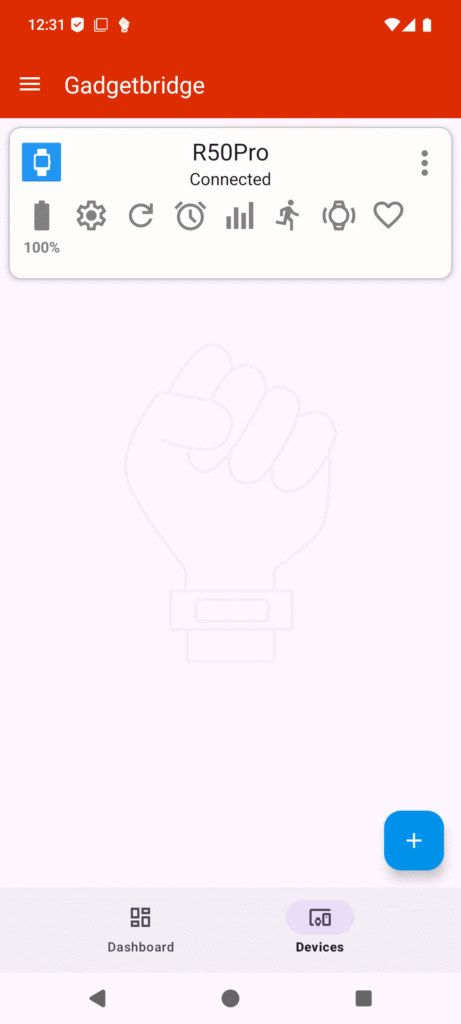
  • The R50Pro smart watch works with Gadgetbridge

    And you don’t need the Da Fit app at all. Nice and easy. Maybe the battery will last a year.

  • How to change your eSIM on Ultra Mobile to an unsupported device

    First, on the Android phone, you may need OpenEUICC, if using a custom ROM.

    You still need the old device. Disable your eSIM. Use the shitty Ultra Mobile app, click change device, Go through it, but don’t click install eSIM, the one that says “This will open your device’s settings”. Just wait for an email, click the link to install your eSIM, then scan the QR code with OpenEUICC. Before clicking next on the page that shows the info, there should be an IMEI field, enter your other device’s IMEI, my other device is an iPhone. I just used the first one. But if it doesn’t work, try the second IMEI.

    You can try switching the profile after you install it, but it doesn’t appear to work. But if I go into settings, Network & Internet, SIMs isn’t grayed out anymore, shows T-Mobile. And I have an icon, so I think I’m connected. Going to reboot, and see if OpenEUICC works again, too lazy to just close it. Also, might need a reboot anyways.

    I use the Magisk module, go to the CI page. Click one of the build-debug ones, and under “Artifacts” click magisk-debug”. If there isn’t one, go back to the other page, and click a different one, or look a the icon.

    Oh and tell them to kiss your ass.

    Nice, I didn’t need to chat with them. If I didn’t get an eSIM, I would have just asked for them to send me an email with the code, if they wouldn’t, I’d ask for porting info.

    I don’t think Tello makes you use their shitty app.

    And that should work with removable eSIMs too, assuming your phone is capable of writing to them.

    Oh and the moto g power 5G 2024 is faster and way better then the Rabbit r1, cheaper too. The Rabbit r1 might break if you drop it, the first time. Feels like a cheap toy.

    and OpenEUICC says it’s enabled now, after rebooting.

    Trying to activate voicemail.

    Hmm, I wonder if AFWall+ is blocking stuff that might need to be allowed. Might have nothing to do with voicemail, that may take a long ass time to activate.

    Probably no RCS support. That might require GApps.

    Now I need to get the rest of my contacts on it, fucking iCloud bullshit.

    Damn, can’t get the exported contacts easily. Guess I have to make a backup, and look in iTunes Backup Explorer. I’ll be looking everywhere, the unback command with idevicebackup2 or whatever doesn’t work right.

    New phone isn’t even completely setup, probably should have waited till later to get the eSIM. Now I’m going to be up for a while, just to get the fucking contacts. Not emailing anything from my iPhone to anybody. Not even myself.

    Said can’t activate visual voicemail.

    Not providing detailed instructions on using OpenEUICC. If you can’t figure it out, just ask them for a QR code. Tell them their app is shit and won’t work on your new phone.

    Going to try exporting everything, so I can search for what I want. Cause the built in search is broken in iTunes Backup Explorer.

    Need my notes db anyways.

    Nobody told me how to get a new eSIM from Ultra Mobile without using their shitty app, I’m insane.

    ./AppDomainGroup-group.com.apple.FileProvider.LocalStorage/File Provider Storage/All Contacts.vcf
    

    There’s the file I exported. You can look in that folder for other crap too. Got all my contacts finally.

    ./AppDomainGroup-group.com.apple.notes/NoteStore.sqlite

    And that might be the right file I need to use this. When I used the unback command with idevicebackup2, there was some notes db, but no notes in it.

    Hmm maybe Ultra Mobile visual voicemail doesn’t work with all phones.

    Well, I got my notes finally. Trying to figure out how to get the images in the output folder.

    And might be because it was set to 3G. Set it to LTE, guess no 5G. Oh well. At least it has eSIM.

    Somebody said changing to GSM only fixed it for them, no idea how to do that. Don’t think I can in settings.

    Oh and fuck Apple too, and Google. I use /e/OS.

  • That was easy

    I got my moto g power 5G 2024 today, and I set it up offline, no SIM card, or WiFi setup, and I already unlocked the bootloader.

    The instructions are on XDA Forums, there’s’ a link somewhere on this site I think.

    According to Treble Info, the moto g power 5G 2024 supports GSI, if anybody is wondering. Not like you’ll find this site if searching for that, I couldn’t find shit about GSI for it.

    Goodbye warranty. Not that I give a shit.

    You can find the firmware here. Or use their shitty Windows program, I can’t though. Probably doesn’t work in Wine.

    In the process of rooting it, first I have to download firmware, to get the boot.img.

    Can I only use Android 14 ROMS if I don’t update to 15? Hmm, guess I’ll download the newest firmware too.

    Haven’t used it enough to know how much slower it is then the iPhone 15, if I care, I wouldn’t have bought a $150 phone.

    LOL says to use SP Flash Tool to flash firmware, mtkclient doesn’t work, so I doubt SP Flash Tool does. Get a boot loop. Had to unplug phone, and hold power button down or something.

    Which zip file has that DA file? And the moto g power 5G 2024 probably uses a different DA file.

    Maybe the firmware file. Slow download speed. My SP Flash folder doesn’t have any DA files. mtkclient is better, not sure SP Flash even works for me, without doing even more work. Might on my desktop, but I mostly use laptop now, even though it has issues.

    Not in firmware file, at least not the old version.

    Wrong version of SP Flash “SP_Flash_Tool_v6.2228_Linux”, where the fuck did I get that? Cause it isn’t here.

    LOL, might explain why it doesn’t work, and might be malware. Got it from the site with an s at the end, most likely.

    “error while loading shared libraries: libpng12.so.0: cannot open shared object file: No such fil
    e or directory”

    It doesn’t work either, cause I have no libpng12. Version not available in Ubuntu 24.04. Might have to use my old Ubuntu Distrobox.

    Don’t follow old info to install an old deb file of it, doesn’t work. Trying the compile instructions now.

    Maybe this will work, same CPU.

    If not, I’ll have to use a script to flash the official firmware, as long as it doesn’t run any lock or unlock commands, it might be safe. But if it doesn’t boot, I’ll have a hard time fixing it.

    Now redownloading V6 of SP Flash, apparently that version is needed.

    DaHandler - Device is protected.
    DaHandler - Device is in Preloader-Mode.
    DAXML - Uploading xflash stage 1 from DA_BR.bin
    DAXML - Successfully uploaded stage 1, jumping ..
    Preloader - Jumping to 0x2000000
    Preloader - Jumping to 0x2000000: ok.
    DAXML - Stage 1 successfully loaded.
    DAXML - Uploading stage 2...
    Progress: |██████████| 100.0% Written (0x2A5/0x2A5, ) 6.39 MB/s
    DAXML - Successfully uploaded stage 2.
    DAXML - Successfully uploaded stage 2
    DAXML - SLA is disabled
    DAXML
    DAXML - [LIB]: DA XML Extensions failed.
    

    Good luck.

    DaHandler - Device is protected.
    DaHandler - Device is in Preloader-Mode.
    DAXML - Uploading xflash stage 1 from DA_BR.bin
    DAXML - Successfully uploaded stage 1, jumping ..
    Preloader - Jumping to 0x2000000
    Preloader - Jumping to 0x2000000: ok.
    DAXML - Stage 1 successfully loaded.
    DAXML - Uploading stage 2...
    Progress: |██████████| 100.0% Written (0x2A5/0x2A5, ) 7.15 MB/s
    DAXML - Successfully uploaded stage 2.
    DAXML - Successfully uploaded stage 2
    DAXML - SLA is disabled
    DAXML
    DAXML - [LIB]: DA XML Extensions failed.
    Dumping sector 0 with flash size 0x400000 as boot1.bin.
    

    Doesn’t work either, that file doesn’t exist. I tried two different preloader files. Hmm, didn’t try the old one from the old firmware, didn’t even extract that I don’t think.

    Failed to dump sector 0 with flash size 0x400000 as boot1.bin.
    

    File from old firmware doesn’t work either, does img need to be converted to bin somehow? According to XDA Forums, no, they are the same thing, with a different extension.

    MT6855V/AZA

    Maybe that’s why it doesn’t work.

    And this script might still work, waiting for it to finish booting.

    No way to backup phone apparently with mtkclient or SP Flash Tool, unless you can get the right files. Almost done booting. Put the latest firmware from here on it.

    (bootloader) Preflash validation failed
    

    So it can’t be rooted?

    Checking if OEM Unlock is still on in settings, I tried unlocking it with fastboot again, and said it’s already unlocked.

    Says it’s already unlocked in Developer Settings.

    Oops, downloaded a pre release, there’s a bug report here. Trying version 27 now.

    Nope, that’s broken too.

    But update the firmware as Android 15 is faster, then 14 that it comes with.

    Trying this now. “A-only device” well, not trying after reading that, LOL. Somebody said to use that, my phone is AB.

    Why the fuck do you have to use an ARM64 device to install? Not on my desk. Maybe just push the apk and install that way.

    Rooting may be the last thing I do, if it works. Then off to bed. Don’t want my sleep messed up anymore.

    Still doesn’t work with version 27. Lots of rebooting too, while reinstalling it.

    fastboot flash vbmeta --disable-verity --disable-verification vbmeta.img

    Maybe that’ll fix it. LOL, downloaded the wrong 27 too. So I might not have needed to do that. Going to reflash that with enable instead. You have to reset it when doing that too.

    Don’t bother, I think if you unlock bootloader, it already did that. So probably was already disabled, LOL.

    fastboot flash vbmeta --enable-verification vbmeta.img

    Maybe you can do that.

    And it finally flashed without an error. No idea if the vmeta was needed, or just the right 27 version.

    And another reboot. Maybe I can get the GSI /e/OS installed.

    And you might want to extract the archive on your computer first. This phone takes a long time to extract it.

    Finally rebooting, to try and boot /e/OS.

    It’s booting, slowly.

    How do I get root with GSI /e/OS? There’s just one img file in the archive, no boot.img. Didn’t inspect the image file though.

    Maybe that adb command works. No adb command, might be in Developer Options though, see here.

    Rebooting to see if it worked. And if you run adb reboot, it will reboot into stock ROM, open the DSI Sideloader, and tap reboot to GSI or whatever it said.

    Need to go to bed though. Don’t need to stay up till 1 AM.

    And the Magisk might work now, makes you reboot. Might reboot into stock ROM though,

    If you know the “dynamic_system” partition, you can use adb shell “reboot dynamic_system” to reboot into it. See here. Too lazy to try and figure out which partition it is. Or maybe I should run the other command while /e/OS is booted, or better run mount.

    Maybe eSIM only works if you have GApps, lame.

    WiFi works, I copied a text file to phone, then copied and pasted the long random password.

    Well, look up eSIM real quick, then off to bed.
  • Apple claims iPhones are private

    But by default, your notes, are stored on iCloud. And this script, may not work if everything is in a shitty iCloud folder. I got the needed file by using idevicebackup2.

    Well, I may do without my notes, as you apparently can’t make a local folder in the shitty Notes app. Only if you disable iCloud.

    There is an app that syncs iCloud notes with Linux, no idea if it works anymore. But what format are the synced notes? I’m not doing any work to convert them.

    I just want a bunch of text files, or some other format, that doesn’t require more then a text editor to view.

    Won’t turn Mac mini on to use some app either. Even though I do need a script from it. I need to look for a Time Machine backup extractor for Linux. Then I don’t need to turn it on. TIme Machine backs up to my desktop and an external drive. No need to even plug the external drive in. Also, that drive is backed up to my desktop too, well not the Time Machine partition.

    Depending on the macOS version, it has built in spyware. Or maybe all macOS versions do. No thanks. Too lazy to block it from the internet. And what’s stopping it from changing it’s MAC address? And if you only allow certain MAC addresses to the internet, what’s stopping it from changing to one of those allowed devices? It can scan the network and find other Mac addresses. Maybe put it in it’s own VLAN, and hope it doesn’t break through the VLAN. Too much work, and too much risk.

    If you want access to it over your network, the safest option is to unplug your internet. But what’s stopping the Mac from installing spyware to your other devices?

    You could copy what you need to a USB drive, but what’s stopping macOS from installing spyware to the USB drive and infecting Linux when you plug it in?

    Tinfoil might stop it. Cover your drive in tinfoil. Maybe your head too.

  • If you care about your Android phone’s bootloader being locked

    You probably shouldn’t have a phone or anything else that stores data. Not even a piece of paper.

    A locked bootloader won’t prevent somebody from getting your data. Even if the data is encrypted. Might be harder to access and/or take longer.

    Might not even be able to access it until sometime after you’re dead. But if they keep the data, eventually, they will be able to access it.

    Even if a Quantum computer can’t, what’s after Quantum computers?

    Also, the government most likely has secret tech, or the military. Just watch Skinwalker Ranch. If you don’t believe in Aliens, that means humans have very advance tech.

    No an iPhone won’t save your data from dicktators either.

    Tech was clearly made for mass surveillance.

    WiFi can be used to spy on people too, convert it to images, and you can see people walking by a store or whatever. The way WiFi currently works, allows somebody to exploit it, and collect data, that can be converted into images.

    I’m too lazy to find the WiFi spying article. Read it on my phone.

    And no, you don’t need a WiFi device on you. There just needs to be other WiFi devices on the network that you walk by.

    You’re screwed if you live in an apartment, I doubt getting rid of your own WiFi would do any good. Your neighbors, can generate images of you in your apartment, see you taking a shit, or shower.

    Maybe if you pad the walls & ceilings & floors in tinfoil, no WiFi signals will get through.