Blog

  • Good luck signing into Gmail with LibreWolf

    This browser or app may not be secure. Learn more
    Try using a different browser. If you’re already using a supported browser, you can try again to sign in.

    Nice security “Google”, who doesn’t do “evil”.

    I think they say Tor Browser is the most secure. I should see if that blocks me too.

    Can still oddly check it on my phone though, using an email app, not made by them.

    Well, might not have internet soon, cause I’m not paying Comcast with a different card. Nor am I making a new PayPal account. All the other bills, will be cancelled too, if that happens. I assume, the bills will cancel themselves as well.

    Might have been because I updated Debian on laptop, and it wasn’t syncing the time. I assume it was before though. Or not, surprised it worked at all then.

    Also rebooted the router after updating it.

    It’s going to be nice if all the time servers go offline.

    Good thing time wasn’t invented. It sure is reliable, and seems like an intelligent design.

  • I got two nuts in a sack

    Well this Kaico HDMI Adapter for the Nintendo 64 works. But no idea what I bought, or anything. It matches the photos on Amazon, but not on their site. Can only find any adapter on their site on the product manual page.

    Didn’t try scanning the QRcode on the box for that manual, I threw it away anyways.

    Got rid of the bad looking edges I saw on the TV when they tested it for me at the Pawn Shop on their TV. No idea if my TV had that when plugged directly into it.

    But on Amazon, it says it outputs to 1080p. I didn’t read under the 1080p on the box. But that’s what the image says for that part of the box.

    Well, it only does 720p. So wtf did I get?

    Well, I also forgot, Amazon sends shit not sealed as well. The person that posted a photo of a completely different one, that matches the Kaico website.

    So maybe they got the right one, and it was defective or incompatible with their TV. No idea what I got though. Looks like some of their other adapters though.

    Also, why only 720p? The switch just changes the aspect ratio.

    Well, it looks good enough for me anyways. But if it’s a knockoff, I should send it back. Cause I don’t like liars. Which is Amazon.

    Also, Kaico seems to be the seller of it as well, it’s on the store they link to on their site. Yet, I can’t find what I bought on their site.

    Search says showing five results, but where? I can’t see no results.

    Good news, probably not a knockoff.

    See here. Looks same as the one I got from Amazon.

    Found it on a search engine, cause their site is broken apparently.

    I guess there is no manual for it though.

    Almost bed time, I wasted a lot of time, doing I don’t even know what. Also, my two nuts in a sack, need some sleeping.

  • Well, receiver might convert AV to HDMI

    Decided to look at the manual today for the receiver. Cause makes no sense, to have those inputs, and be required to use the same kind of cable for the output. As the receiver does 4k.

    Well, you have to plug the HDMI to TV, in a different port. If you want to use ARC as well, you’ll be using two HDMI ports on the TV.

    Going to try it soon though. That’s just what the manual says. And if it has to be in a 4k HDMI port, then I basically need a converter of some kind.

    Too many opinions, that I want to see what it looks like before I buy it. And then I’ll just buy what I want and think will be good enough for me. All those people with opinions, aren’t going to be looking at my TV after all. Some say you need to mod the original Nintendo 64 to get the best or acceptable image on modern TVs. Hmm, well, if that’s the case, I need a CRT or a old projector. Also, that’s their opinion. Some say S-VIDEO is better. But for everybody? Probably not. Some are using a cheapo cable with HDMI, and somebody says they researched, and therefore didn’t try anything cheap. Might do something funky. But does it affect all TVs? Do all people care? The person even that posted about the cheapo thing that works fine for them in response to the researcher, said it’s good enough for them. And they bought it, tried it, and guess what? It’s good enough for them.

    So if you just want to spend a ton of money, then go ahead.

    Also, I think I can change the “passthrough” device to a non 4k port. Meaning, I may have to buy nothing. Got to see what it looks like first. And if what I buy sucks, depending on how much it is, well, I’ll just live with it. Cause if I decide to spend $80 or so, and it doesn’t do much, I’ll either send it back, or keep it. Doesn’t mean I’ll buy anything else either, especially not anything that costs more.

    Well, I guess that’s what the passthrough setting is for.

    Looks like the passthrough setting doesn’t do anything. Good luck getting video from a Nintendo 64 with this receiver on the TV.

    Instead, I just plugged it into the TV, cause I noticed it has the right inputs, and got a video.

  • I thought Linux was better?

    Not if you are trying to access an old iPod.

    Try with openSUSE Tumbleweed. Good luck, if it’s formatted with hfsplus. That Wiki is useless as well. Cause it seemed to suggest, you need to recompile the kernel without EFI boot partition enabled.

    Nope, Linux removed hfsplus support.

    Well, Debian is using older kernel, and it’s copying the music now.

    Might have some or all of music, but too lazy to check. So I’ll just copy it all again.

    He wants to replace the battery and screen. And maybe the drive. You can get a adapter to use a mSATA drive. Might want to replace the firmware as well, cause apparently at some point, if I upgrade Debian, we may not be able to access the drive without formatting it.

    Won’t sound good? Well, then you might as well be an audiophile, and waste all your money.

    Just like with TVs, doesn’t look good? Keep on upgrading the DRM, until you can’t use it with something, or you know watch something you want to watch.

    This might take a while as well, guess I’ll hook Nintendo 64 up. Assuming the receiver has the right inputs, he said it does, he was with me when I bought it. So it probably does, I just forgot, cause I didn’t think I’d need it. The Xbox Series S is gone, a direct trade, at the pawn shop, and got one game.

    I could have got $300 for the Xbox possibly, if I sold it to somebody myself. But too lazy to ship it, and not meeting some stranger off the internet either. And not asking somebody else to do it either. Don’t care about the money anyways. They had something I wanted, and even got a six month warranty. Good enough for me.

    Got more crap to get rid of as well. But the other stuff I didn’t bring in, cause somebody I know might want some or all of it. But the Xbox Series S? No disc drive. If something happens to internet, good luck getting anything else to play on it.

    Also, I don’t need it, was just sitting there, unused, for a long ass time. Basically almost brand new. And the other crap I traded them as well with it.

    Also, the people at the pawn shop are nice. So I’ll likely go there again. Got a receiver I like and speakers, then traded an Xbox, for something I want, and who knows what else I’ll want or have to get rid of. Got one game as well. But not really needed, he did test it.

    Need an upscaler possibly though. And may have bought something that’s better then one game anyways. Too bad you might have to import that if buying it new though. But who cares, used is good enough. Don’t care if it’s the same price as new overseas either. Pretty damn close to where they are shipping from. Good luck finding any online store, that ships it that close as well.

    Amazon? Don’t like Amazon. And they do have something that might be a clone. But it’s probably junk.

    Need to find the best budget upscaler for Nintendo 64, and that can be used with other systems.

    There’s a clone upscaler, but not sure it’s worth buying or not. Sounds like the original is better, and not bidding on eBay to get one, how much will the final bid be? Too lazy. Cause somebody is willing to pay more then me anyways.

    A new one might be cheap, if you don’t live in the US. Also, that wasn’t in dollars either.

    Supposedly you can get a new regular OSSC or whatever on Amazon for $180. But is that even worth it? Also, need to look at that, to see if it has the right inputs.

    The mClassic might be junk. And you can’t just plug a Nintendo 64 into it.

    And I had an upscaler thing, a crappy thing. Do I still have it? And can it be set to 480p? Cause it could convert the 64 to HDMI, and use it with the mClassic. But only way to find out if the mClassic is good enough is to buy it. Not sure I want to convert the video to HDMI and buy that thing just to see. Now if I give somebody money, they buy it on Amazon, I might be able to return the mClassic. If it’s useless.

    If I could find a nice little CRT TV, that would work too. Somebody mentioned some education projector, but you can’t buy it on eBay. It’s discontinued, and not on eBay.

    Too lazy to keep looking at projectors, and don’t really want to replace bulbs. Do want to see what it looks like on a projector now though.

    Mom has some little projector, need to see inputs on it. If it has any. Hmm, a cheap projector. But if it’s not bright and ultra short throw, it’s useless to me.

    Then I can get a “dumb” TV as well. Goodbye Vizio junk. Walmart owns Vizio, and my mom’s TV froze the other day, buttons didn’t respond either.

    How about a Japan made TV? Probably can’t buy one in the US though. Good batteries come from Japan. Crap comes from China.

    Made in America? That’ll be like China if that happens now. The people will get paid as much as the people in China, or less.

    Apple makes their crap in China for a reason. Except this iPod somehow still works.

    And how long has Apple been making their crap in China? Probably before Tim Cook.

    I do know, I wouldn’t want a robot doctor, unless maybe it was made in Japan. Might just blow itself up before it sees you. But also, might murder me when I get a prostate exam.

    Sound no video with receiver, looks like on the back of receiver, says monitor in one spot where the yellow video plug is. Above that, says video and something else, probably output.

    Well, too lazy to plug it directly into TV. No idea if it has the right inputs. 6 month warranty, and I saw them test it.

    Looks like it doesn’t output the signal to HDMI, therefore, it has no upscaler. Well, I guess I need an upscaler then.

    Recopying the music with Strawberry, cause I don’t like all the underscores in the filename. And too lazy to mass rename them as well, and it failed to copy at least one file.

    Clementine, didn’t even show anything under Unknown either. Strawberry is a fork of Clementine I think, and for some reason does.

    The OSSC not on eBay from a US seller, unless you want a broken one.

    Also, need to check how much money I have as well.

    Can Linux get the iPod model number? Maybe not, not from lsusb, doesn’t say the exact model number. Says it’s a video one though. And I know it’s 30 GB.

    How many iPod Video 30GB models are there?

    Can’t see if there’s an about on the iPod, cause it’s plugged in and copying files.

    Don’t want to take case off yet, cause it’s a pain. Was a pain for somebody else, so probably more of a pain for me. I can’t even open grocery bags at the store always.

    Searching eBay for “retro upscaler” and then I’ll search internet if I find something that looks interesting enough.

    Well, eBay is broken, cause I might see a OSSC now, from the US.

    Not the Pro one, no idea if it’s worth $160 or not. Cheaper then Amazon. But I’d want faster shipping, cause that shipping might be super slow. How much is that?

    Might be better then that cheaper clone thing. But everything is an opinion, therefore, who knows, the cheap thing might be good enough.

    Also, emulation is about accuracy, not just visual or input lag. If you use a software emulator, well, apparently it’s made for one game, then a bunch more games, but 7 years ago, no emulator developers cared much about making all games as accurate as possible. Except for Higan or whatever, and doesn’t do Nintendo 64. Also, I wonder what the system requirements are for it.

    The hardware things are the best ones, either original, or the expensive ones. Oh yeah, I need to check their site.

    Hmm in stock, and only $270. For the 64 one. But I like the original system anyways. And also, I’d need more money. Well, there’s plenty of crap in my apartment after all.

    Just don’t take the cash myself. Give it to somebody, they buy it, keep it at their house as well. Might be moving soon anyways. Just look at what the US is doing. Might also be dead soon as well. Now that protesters are getting shot.

    Need a controller adapter and/or wireless controller for it as well. The cord reaches, but still like wireless. Also, if it breaks, an adapter is nice.

    Not a mid life crisis, based on shit happening in world, I may very well not live to be 40. So more like a near end of life crisis.

    OSSC might be too expensive, you might need something else to connect Nintendo 64 to it. Saw something, but around $100 I think.

    They have cheapo converts. Think I have something like that for Wii. But I want a better one, that I can also plug Wii into.

    And anything else I get or want to plug into it. Rather buy one thing to do it all.

    Hmm mini LCD, only $212 or so, and $11 shipping. Is that an old LCD? Cause, that might work too.

    It’s used, but who cares.

    Also the Retroscaler2x is $65. But the other one was $100 or so. Maybe it’s worth $65. If it’s the same thing.

    Says you need an upscaler, and now I know how to “make” my own LCD display. They used an old iPad display and some other crap.

    Adafruit, sells eINK displays. Can I use that HDMI board and an eINK display? Not for the Nintendo 64 obviously. Those things are slow, but sweet. Turn the power off, and the image stays on it.

    And using one with a SBC, not sure you can just connect and use it. Unless, it has HDMI.

    Hmm, that thing might work with laptop screens as well.

    Do they make an eINK display controller?

    That brand doesn’t.

    Good idea, take display from Kindle. Amazon sucks anyways.

    eINK is good for reading. But the Adafruit eINK displays don’t seem that expensive.

    Would be funny to connect HDMI to eINK. The only way, might be with a SBC and a capture device though. And maybe custom software as well.

    Oh yeah cheap portable projectors. Need to see what the resolution is on them. Cause if it’s 480p or less, it might work as well. Doubt they have a good upscaler though.

    And now looking at a bad review on the Retroscaler2x. More like opinion. Maybe their TV and it sucks together. Do they have a Vizio if that’s the case?

    Hmm, most of the pictures are too fucking close. If you sit that close, there’s the problem.

    Well Hisense TV, better then mine. Cheaper, therefore better. And Walmart owns Vizio now.

    Only thing good, would be a Japan made TV.

    Also, my cable has SVIDEO apparently. It’s one of those most likely after market cables, that support more then one system as well.

    That might be fine, but the GBS Control might be better for Nintendo 64, and 5 months ago they posted that. But doesn’t the GBS Control need a modded console? Or just an SVIDEO cable? Sort of modded I guess. Hmm, whatever I saw on my phone, may have been something else. Cause that might be the one, you can make yourself. eBay might have one for lazy people.

    Also, the Amazon link is no longer available for possibly the GBS Control as well.

    Well, the board is cheap. But I’m super lazy. $180 possibly if that’s the same thing. Better? Not sure I care enough to spend that much.

    $139, maybe.

    And if it needs SCART, is there just a cable? Think I read about that long ago. Might need more of a mod, as in soldering. Might need another Nintendo 64 in that case, in case we fry it.

    Oh wait, there’s at least two people to ask. One of them is younger then me. If he knows how, maybe he’s better then me and the other person. If I do it, it’ll likely get fried.

    And the $139 one might have the right input, and no SCART needed. But SCART might have a better picture, especially with newer shit.

    Hmm, I wonder, if the $56 Retro scaler thing, shipped from China? Didn’t click it yet. Also, other sellers with it for $139. Need the seller with best feedback, cause it might be custom made.

    And it might just be better to buy the board and do myself. But I’m lazy.

    And need a SVIDEO only cable, if I use SVIDEO. But since I got a fancy thing, I can also disable the blur filters, sweet. I got many options.

    And why can’t it copy this fucking song? When I can manually.

    Need to make a test file with filename, so I know if I need to remove a character. Cause I only copied with the original filename.

    “File name too long”

    Haha, there you go.

    How do I limit the filename, without editing the filename to save as? Probably can’t. Darn.

    Album and title look to be the same, and very long.

    There it copied finally.

    Also, bad review, using wrong cable most likely. So, maybe just pay $56 or so for the clone of the better thing. Or possible clone.

    People in other countries use it, and are happy. Good enough for me.

    And the 64 in one opinion, looks like crap on modern displays, possibly with anything. Another reason to spend only $56, as I do get to plug directly into receiver. And maybe it’s good for something else.

    And a good scaler, will make 64 look good. In a different opinion. So which one $56 or $139? If they both are about the same image wise, then $56. But it’s a damn opinion. And I might be somewhat blind anyways.

    I didn’t notice her cock after all.

    Many people are more picky then me after all, I don’t care about body parts after all. So $56 from US seller, with fast enough shipping, might do it for me.

    And don’t put zip code in, refreshed, $56 one gone.

    From China, like I thought.

    Had to take case off, couldn’t scroll. Probably user error. I forgot. Also, never really had this kind of iPod. Just the little ones.

    One more thing, drop your panties on the floor, and ride a cock to the moon.

    Moon person, moon person.
  • Good year so far

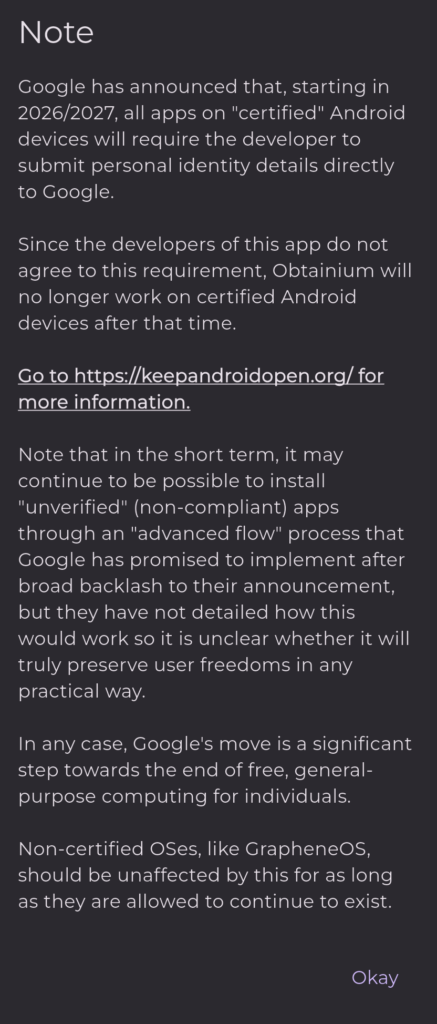
    Google said not to be evil, they meant to be evil.

    Why do that? Not just greed, to control

    Mass surveillance.

    My phone may not be affected, since it’s rooted, and don’t plan on updating it. But that means it’s even easier to hack.

    And all they’d have to do, is make everybody buy a new phone. Well, I won’t.

    At least Android is “better” then iOS. They both suck, in my opinion. Just like Macs, PCs, and all other tech. It sure helps the military make killing machines though.

  • HDMI CEC is junk

    Must have broke itself at some point. Not fucking with it, so disabled it. Sound still works on Atari VCS.

    The universal remote wasn’t able to change the input with a macro either. Was, then stopped working again, don’t know if it’s working right now or not.

    Maybe that’s a TV problem. Good luck getting a non slow TV, they call them “smart” TVs. Depends what you want, if you want a 58″ or so 4k TV 60 Hz, and doesn’t matter if it has HDR even, well there’s zero new consumer TVs apparently in the US that aren’t “smart”. Business TVs? Rip off. Projector? Bigger rip off.

    Tech is a scam anyways. How much does it cost anybody to make anything in China? They barely pay those people anything. Take Apple for example, and look how marked up their shit is.

    They all are likely doing the same thing as well, if it’s manufactured in China.

  • Mythtv works

    Mythtv should be working finally. Using Tvheadend + https://github.com/bnhf/chrome-capture-for-channels as well.

    Was trying to use Dispatcharr, but was having a buffering problem. Eventually got buffering with Tvheadend.

    Then figured out there’s settings you can change in Kodi. Those settings should be right for me now as well.

    The buffering I’m pretty sure can be caused by the network, but some of those caching settings say it helps lower powered devices as well.

    The settings I used on a Atari VCS, may or may not work for say a cheap or old Android TV box.

    I only added three channels to Tvheadend from the cc4c stream.

    Also, why couldn’t anybody use cc4c for anything other then Channels DVR? Didn’t ask for my Channels DVR info. It’s a Docker image. And most if not all of it is open source. Might be pretty easy to duplicate it with the code they provided, if it stops working because I cancelled Channels DVR.

    Works with DirecTV Streaming. And if it stops working, and I can’t fix it, or nobody else fixes it, then I’ll have a reason to cancel that too.

    I record some OTA stuff too.

    Why not just use Tvheadend? Looks pretty damn complicated, lucky I figured out how to add the streams from cc4c and transcode them without reading much. Used basically the same ffmpeg options as I was using with Dispatcharr.

    There’s other things like Dispatcharr as well, but if using a SBC, not sure any support much hardware encoding on any SBC. I was trying to use a static ffmpeg with Dispatcharr, maybe that static ffmpeg has issues. Most of the ones I saw use Docker.

    Hmm, xTeVe might not do transcoding. But would be easy to make a M3U possibly with it, and import it into Tvheadend. Then I don’t have to really touch Tvheadend to add more channels. Not really that hard though. No Docker needed for that as well. The other things might work without Docker, if you compile it.

    Instead of compiling Dispatcharr or something, modify it, so that it uses some other ffmpeg, there might be a Docker image with a working ffmpeg. Well, Jellyfin Docker image likely works with ffmpeg on my Orange Pi 5.

    Why not record TV with Jellyfin? Not sure I like it, and kind of pointless if using Kodi. I can just use Gerbera anyways. Not sure there’s any point, since I can just add the folders from the SBCs directly. But it’s setup.

    You only need Jellyfin and crap like that if using a Android TV box or something else like that. Some Apple TVs can run Kodi as well, but do they need transcoding on the server?

    Apparently the Amazon Fire crap has issues with Kodi.

    Changing the encoding options, on cc4c may have fixed it as well. But I’m lazy, and not sure what all the options are. Can cc4c use a different audio format? Cause that may have been one issue. Looks like it can, wonder what one I’m using. Maybe change that to aac or mp3. Think Tvheadend is using mp3. Too lazy to look or change it. Works fine like this anyways.

    The audio and video bitrate might need to be changed as well on cc4c.

    Also, the TV Everywhere channel in Channels DVR is not the right number for everything. If using Schedules Direct. And the DirecTV Stream lineup.

    Might have fixed itself, if I put in “Discovery Channel” for the channel name. Instead of just “Discovery”.

    You can get the right channel, with tv_grep, you run the tv_grab command first and –out to file.xml, then use tv_grep with it. Just search for a show that you know is on the channel you want.

    Does that do 4k? And does DirecTV do any 4k at all on anything?

    If it does with Android, there’s [ADBTuner](https://adbtuner.github.io/). Does it work with DirecTV though? It sounds like cheap Android TV boxes suck though. Should have kept my NVIDIA Shield, assuming I had one. Apparently Kodi works good on that as well.

    Looks like they still make those, but the TV one, not sure that’s good enough. And the Pro one only has 3 GB of RAM. That means my caching settings in Kodi might not work on it. Unless the GPU is better on it, then my Atari VCS, or I have some GPU hardware acceleration setting wrong.

    And you might need it plugged in using HDMI to the thing that’s recording it as well. A network capture card, would be the best option for me. Unless one of the SBCs can use my USB capture device, and the capture thing does the encoding. And it still doesn’t need too much CPU. It’s a cheap capture card. Rather buy a network one, instead of some other USB one.

    Also, some HDMI things can apparently be hacked to be made into a network capture device, might be even cheaper. Might be HDMI over IP, had one of those.

    Unless I don’t hook whatever I buy up to the TV as well. But there’s multiple questions to answer, if DirecTV doesn’t do 4k at all, or on anything I record, then there’s no point.

  • Glad I could be of service

    Some people apparently search for shit they don’t like, read it and get mad.

    Well, might as well keep paying for this as long as I can.

  • How long do used NASes last?

    Well, my old small form factor PC is still working, which is basically being used as a router.

    Don’t need the NAS to have any drives. Don’t want any used drives anyways. I’ll just buy some old stock “refurbished” drives. If it comes with one or two of those, then that’ll work too.

    I could get a small form factor PC, but not as small as I’d want. But the pawn shop might have one for $80. Might not be the exact same model as mine, or a local location either. Depends how much the shipping is. If it isn’t free shipping, probably not worth it.

    Got to check NAS prices anyways. Don’t care what brand really either. Also, might not even get one. Just wondering how much a used one is.

    Why buy new shit anymore anyways? Next year could be horrible for a lot of people.

    Well, I forgot, I have a HD dock plugged into Raspberry Pi, with a drive in only one slot. The main drive is a regular USB drive, the reason that drive kind of sucks. NAS drive in a decent enclosure, apparently works just fine though. Maybe even one of the drives on Orange Pi 5 is fine as well.

    Also, don’t really need another drive, or more storage. In that case, I just need the cheapest drive I can format, and never put anything on it.

  • Easy to freeze KDE and/or Linux

    Not completely frozen, but can’t use it. All I had to do was dd from a USB SSD, to a USB drive on the network, over NFS. And also, open the folder in file manager.

    Is this a software problem? Well, people say USB sucks for drives.

    But not sure it has ever been this bad until recently.

    Might just get a USB extension cable or two, and plug shit into that, instead of the front USB ports on this case. As I think I’ve read reviews where people said the USB ports were bad on a case they bought, so they might also go bad as well.

    Most of my stuff is plugged into a hub, but that’s full. The NVMe external SSD though is plugged into the back. And in a faster port. The SSD I’m backing up with dd is the Atari VCS’s SSD, and just looks like a little USB flash drive. Didn’t put a drive in it. Came like that.

    Should be one or two USB ports free. Need two ports though, sometimes I have two things plugged into the front.

    Now to see if laptop freezes if I try to open that folder.

    Well, didn’t freeze it. Oddly it didn’t mount by itself when turning laptop on. Refreshed a couple times too.

    Guess it could be a hardware problem. It apparently only affects the desktop when it’s happening. So might not be a KDE problem after all.

    Could be a openSUSE Tumbleweed problem though, with something else.

    I could try dding something else to that same drive, and see if laptop freezes as well. But don’t got anything to do that with. Also, this is supposed to be a SSD, why is it taking so damn long?

    Oh yeah, dmesg has a bunch of nfs crap on desktop as well. Something about timing out or not responding or something.

    I do know, KDE will have issues if a network share goes down, when it’s mounted. If you umount it or when it becomes available again, there’s no issues. Or is that a Linux problem that doesn’t affect just KDE?

    And if either of those things can be fixed with some setting change, well no idea why I have to do it. That should be the default.

    Now to SSH into desktop, and see how it works.

    Might be a KDE problem, as ssh seems fine. I ran top, and it reloads a lot.

    I could easily see if that’s the case, just dd something on laptop in KDE, if it has a freezing issue, then it’s probably KDE. Then try something else, like Gnome, or XFCE or anything, and see if it freezes too. If all desktop environments freeze, sweet. Might as well say it’s a Linux problem then.

    That might also make both computers completely freeze and maybe even the Raspberry Pi.

    Should still get some extension USB cables, just in case.

    I wonder why the USB Type-C on the case doesn’t work. Is it even plugged in? No idea, can’t remember.